CPU-Z VALIDATOR V3 - BETA VERSION - DEV ENVIRONMENT
Dump [4eh51ebb] Submitted by Valid LDLC - 2026-08-11 07:35:43
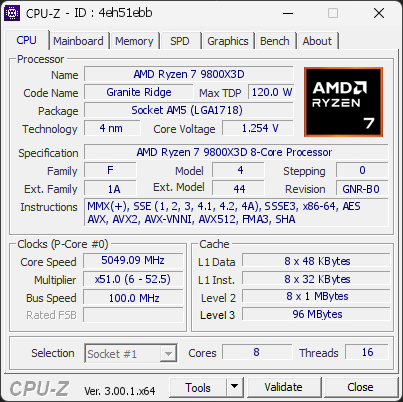
AMD Ryzen 7 9800X3D 8-Core Processor
5049.09 MHz
MSI PRO B850-P WIFI (MS-7E56) · 32 GB DDR5-6406 · AMD Radeon(TM) Graphics
Warning
CPU-Z 3.00.1 (Beta)
Date: 2026-08-11 07:35
Type: Quick Check
Duration: 17 minutes
System Analysis
4 Warnings 3 info

The drive WDC WD20EARX-00PASB0 has logged 209 CRC error(s) on its SATA interface. These are bus-level transmission errors and indicate a connection problem, not a fault with the drive itself. Common causes are a loose, damaged, or low-quality SATA cable, a faulty SATA port, or a flaky backplane or drive sled. The counter is cumulative over the drive's whole lifetime, so these errors may be years old and come from an issue that has long been resolved.

If the count is still increasing, reseat the SATA data cable, try a different SATA port, and replace the cable if errors continue to accumulate.

The drive Samsung SSD 850 EVO 500GB has logged 1,632 CRC error(s) on its SATA interface, a high count that points to a connection problem. This is NOT a drive failure; the drive itself is likely healthy, but the cable, port, or backplane carrying its data was unreliable when the errors occurred. The counter is cumulative over the drive's whole lifetime, so these errors may be years old and come from an issue that has long been resolved.

If the count is still increasing, reseat or replace the SATA data cable, try a different SATA port, and check for issues with the drive sled or backplane in this chassis. If multiple drives in the same system show CRC errors, the chassis wiring is the likely culprit.

2 running program(s) are known to consume resources in the background with little benefit (preinstalled trials, redundant cleaners, or permanent helper services).

These programs are often preinstalled by the PC manufacturer or bundled with other software, and keep running at every startup even when unused.

Uninstalling them, or disabling their automatic startup, frees memory and shortens the boot time. The Processes button in the Software section lists each detected program and why it is flagged.

Your CPU is running at a high temperature (95.1°C). At this level, the processor may slow itself down to avoid overheating.

This usually means the cooling system is struggling to keep the CPU at a safe temperature. It can happen if the cooler is clogged with dust, not working correctly, or simply not powerful enough for this type of processor.

We recommend checking that the fan spins normally and that the cooling system is properly installed. Cleaning the cooler or improving airflow can help bring the temperature back to a safer range.

The drive WDC WD20EARX-00PASB0 has performed 384,443 head load/unload cycles, exceeding the 300,000-cycle rating typical for desktop hard drives.

Some drives park their heads after only a few seconds of inactivity to save power, which can inflate this counter far beyond its design rating over the years. Exceeding the rating means the parking mechanism is past its validated wear envelope, not that failure is imminent.

Keep backups of important data and monitor this drive's SMART attributes. If the counter grows quickly, the drive's idle-parking timer can often be relaxed with a manufacturer utility.

The drive SanDisk SDSSDXPS480G has reported 1 media error(s).

Media errors indicate that the drive was unable to read from or write to the NAND media successfully. A small number of media errors may be recoverable, but any increase can indicate failing flash cells, controller issues, or progressive drive degradation.

Back up any important data on this drive immediately, monitor the error count for further increases, and consider replacing the drive if the count continues to rise or reaches a critical level.

We detected 1 storage device(s) that are not partitioned or formatted. The affected device(s) are: SanDisk SDSSDXPS480G. Windows cannot use these drives until they are initialized and set up.

Open the Disk Management tool to initialize the device(s), create a partition, and format the drive so it becomes usable.

01 Processor (CPU)
Max. Frequency
5226 MHz
L3 Cache
96 MB
Peak temp
95 °C
095 °C
Power (TDP)
131 W
0162 W
CPU Name
AMD Ryzen 7 9800X3D 8-Core Processor
Cores & Threads
1 CPU | 8 Cores | 16 Threads
Frequency
5049.09 MHz (50.5 * 99.98 MHz) - Max Turbo: 5225.92 MHz
Multiplier
Current: 50.5 | Min: 6 | Max: 52.5
Architecture
Granite Ridge | Stepping: GNR-B0 | Technology: 4 nm
CPUID / Ext.
F.4.0 | 1A.44
IA Extensions
MMX (+), SSE, SSE2, SSE3, SSSE3, SSE4.1, SSE4.2, SSE4A, x86-64, AES, AVX, AVX2, AVX512 (DQ, BW, VL, CD, IFMA, VBMI, VBMI2, VNNI, BITALG, VPOPCNTDQ, VP2INTERSECT, BF16), FMA3, SHA
L1 Data Cache
8 x 48 KB (12-way, 64-byte line)
L1 Instruction Cache
8 x 32 KB (8-way, 64-byte line)
L2 Cache
8 x 1024 KB (16-way, 64-byte line)
L3 Cache
96 MB (16-way, 64-byte line)
Microcode
Rev. 0xB404035
TDP
120 W / PPT: 162 W
Temperature
Current: 85°C | Max: 95.1°C | TjMax: 95°C
Type
Retail
Benchmark (Score)
Z-Score: 2840.9 (Single Core: 2060.8 / Multi Core: 3916.2)
Benchmark (Details)
INT: 177.5 Gops - FP: 130.7 GFlops - SIMD INT: 2348.5 Gops - SIMD FP: 2497.7 GFlops
02 Motherboard
Model
MSI PRO B850-P WIFI (MS-7E56)
Socket
AM5 (LGA1718)
North Bridge
AMD Ryzen SOC rev 00
South Bridge
AMD B850 rev 51
BIOS
American Megatrends International LLC. 2.A82 (03/17/2026)
03 Memory (RAM)
Total Capacity
32 GB
Channels
128 bits
Dual Channel
Effective Speed
DDR5-6406
3203 MHz
Memory Slots (2 / 4)
empty
S0
CORSAIR
16 GB
S1
empty
S2
CORSAIR
16 GB
S3
Total Size
32768 MB (32 GB)
Type
Quad Channel (128 bit) DDR5-SDRAM
Frequency
3203 MHz (DDR5-6406) - Ratio: 1:32
Timings
36-48-48-104-156 (tCAS-tRCD-tRP-tRAS-tRC)
Slot #1 Module
16 GB Corsair DDR5-6400 CMK32GX5M2B6400Z36 (WW36'25)
Slot #2 Module
16 GB Corsair DDR5-6400 CMK32GX5M2B6400Z36 (WW37'25)
Benchmark
Bandwidth: 67.2 GB/s - Latency: 94.0 ns
04 Graphic Card (GPU)
GPU Clock
2340 MHz
GPU VRAM
16 GB
RTX 4070 Ti SUPER
Peak GPU temp.
75 °C
0100 °C
#1 AMD Radeon(TM) Graphics
Name
AMD Radeon(TM) Graphics - Manufacturer: MSI
Freq.
600 MHz
Units
Cores: 128 | Render (ROP): 4
VRAM
512 MB @ 3200 MHz
Drivers
Version 32.0.11034.2 (07/30/2024)
#2 NVIDIA GeForce RTX 4070 Ti SUPER
Name
NVIDIA GeForce RTX 4070 Ti SUPER - Manufacturer: Gainward
Freq.
2340 MHz (Turbo: 2640 MHz)
Specs
Process: 4 nm / Transistors: 45.9 B / Die Size: 379 mm² / TDP: 285 W
Units
Cores: 8448 | Texture (TMU): 528 | Render (ROP): 96
VRAM
16 GB GDDR6X (Micron) | 256-bit Bus @ 10501 MHz
Drivers
NVIDIA GeForce Driver 610.74 | Version 32.0.16.1074 (07/02/2026)
Benchmark
41986.4 GFlops - Render: 155.3 FPS (AVG) / 123.5 FPS (1% Low) - VRAM: 599.0 GB/s
05 Storage
C:\Force MP510 (FW: ECFM22.5)
77% usedTotal 447 GiB
Name
Force MP510 (FW: ECFM22.5)
Size
447 GiB (~480 GB)
Type
Fixed SSD - Bus: NVMe PCIe 4x 3.0 (8 GT/s)
Volume
C:\ - Size: 446.1GB (76.9% used)
Run Time
Power Cycles: 3411 | Power-On: 26581 h (~1108 days) | 113.3 TBW
Health
Remaining Life: 54% | Media Errors: 0 | Temperature: 54°C
Benchmark
Read: 3444.5 MB/s (124.6K IOPS) - Write: 1254.0 MB/s (120.2K IOPS)
E:\WDC WD20EARX-00PASB0 (FW: 51.0AB51)
55% usedTotal 1863 GiB
Name
WDC WD20EARX-00PASB0 (FW: 51.0AB51)
Size
1863 GiB (~2000 GB)
Type
Fixed - Bus: SATA - Controller: PCIe 1x 1.0 (2.5 GT/s)
Volume
E:\ - Size: 1863GB (54.5% used)
Run Time
Power Cycles: 5509 | Power-On: 40095 h (~1671 days) | Load Cycles: 384,443
Health
Media Errors: 0 | Temperature: 36°C
F:\Samsung SSD 850 EVO 500GB (FW: EMT02B6Q)
72% usedTotal 465 GiB
Name
Samsung SSD 850 EVO 500GB (FW: EMT02B6Q)
Size
465 GiB (~500 GB)
Type
Fixed SSD - Bus: SATA - Controller: PCIe 1x 1.0 (2.5 GT/s)
Volume
F:\ - Size: 465.7GB (71.5% used)
Run Time
Power Cycles: 2973 | Power-On: 20892 h (~871 days)
Health
Remaining Life: 97% | Media Errors: 0 | Temperature: 33°C
#4 SanDisk SDSSDXPS480G (FW: X21200RL)
Name
SanDisk SDSSDXPS480G (FW: X21200RL)
Size
447 GiB (~480 GB)
Type
Fixed SSD - Bus: SATA - Controller: PCIe 1x 1.0 (2.5 GT/s)
Volume
No Volume found!
Run Time
Power Cycles: 5320 | Power-On: 37947 h (~1581 days)
Health
Remaining Life: 100% | Media Errors: 1 | Temperature: 39°C
06 Display
#1 BNQ ZOWIE XL LCD (W37'2017)
Monitor
BNQ ZOWIE XL LCD (W37'2017)
Spec.
27.2 inches (69.1 cm) | 2560 x 1440 pixels (QHD) @ 50-144 Hz
#2 MSI MPG271QX OLED (W03'2024)
Monitor
MSI MPG271QX OLED (W03'2024)
Spec.
27.5 inches (69.8 cm) | 2560 x 1440 pixels (QHD) @ 48-255 Hz
07 Software
Operating System
Microsoft Windows 11 Professional (x64) - 25H2 | Installed on 2026-01-26
Security
Secure Boot: Enabled | TPM: Enabled (V2.0 hardware)
Features
Code Integrity: Enabled
Antivirus
Windows Defender: Enabled | Up to date
Boot Time
52 seconds (POST: 16 s. | Logon: 12 s. | Startup: 24 s.)
Processes
168 running processes, 2 bloatware detected
CPU-Z Version
3.00.1.x64b
CPU-Z SCREENSHOT Warning [4eh51ebb]
Forum Banner
[url=https://valid.cpuid.com/4eh51ebb][img]https://valid.cpuid.com/cache/banner/4eh51ebb.png[/img][/url]
Join us on Discord
Join our Discord
Telemetry
Duration: 00:17:15
Timeline charts