CPU-Z VALIDATOR V3 - BETA VERSION - DEV ENVIRONMENT
Dump [731gdkwb] Submitted by DTB-VS2022 - 2026-08-11 20:48:17
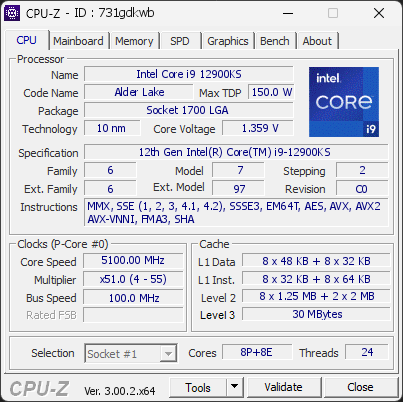
12th Gen Intel(R) Core(TM) i9-12900KS
5100.00 MHz
ASUS TUF GAMING Z690-PLUS WIFI D4 · 64 GB DDR4-3200 · NVIDIA GeForce RTX 4090
Healthy
CPU-Z 3.00.2 (Beta)
Date: 2026-08-11 20:48
Type: Quick Check
Duration: 5 seconds
System Analysis
1 Warning 1 info

Your processor's power limits (PL1/PL2) appear to be set to an unlimited value. This means the CPU is allowed to draw as much power as it wants, with no enforced safeguard beyond what the cooling and voltage regulation can sustain. While this can unlock maximum performance, the processor may run hotter, consume more energy, and experience increased electrical stress over time.

This configuration is often applied automatically by motherboard manufacturers through performance-enhancing profiles. Even without any user changes, many boards ship with these limits effectively disabled by default.

We recommend reviewing your power limit settings in the BIOS or in the software provided by your motherboard. Restoring sensible PL1/PL2 values (typically aligned with the processor's rated TDP) can help lower temperatures, reduce power consumption, and extend the long-term reliability of your CPU.

Your CPU is running at a high temperature (100°C). At this level, the processor may slow itself down to avoid overheating.

This usually means the cooling system is struggling to keep the CPU at a safe temperature. It can happen if the cooler is clogged with dust, not working correctly, or simply not powerful enough for this type of processor.

We recommend checking that the fan spins normally and that the cooling system is properly installed. Cleaning the cooler or improving airflow can help bring the temperature back to a safer range.

01 Processor (CPU)
Max. Frequency
5201 MHz
L3 Cache
30 MB
Peak temp
100 °C
0100 °C
PL1/PL2 unlocked
Power (TDP)
257 W
TDP 150 W
0257 W
CPU Name
12th Gen Intel(R) Core(TM) i9-12900KS
Cores & Threads
1 CPU | 8P + 8E Cores | 24 Threads
Frequency
5100.00 MHz (51 * 100.00 MHz) - Max Turbo: 5201.25 MHz
Multiplier
Current: 51 | Min: 4 | Max: 55
Architecture
Alder Lake | Stepping: C0 | Technology: 10 nm
CPUID / Ext.
6.7.2 | 6.97
IA Extensions
MMX, SSE, SSE2, SSE3, SSSE3, SSE4.1, SSE4.2, EM64T, AES, AVX, AVX2, FMA3, SHA
L1 Data Cache
8 x 48 KB (12-way, 64-byte line) + 8 x 32 KB (8-way, 64-byte line)
L1 Instruction Cache
8 x 32 KB (8-way, 64-byte line) + 8 x 64 KB (8-way, 64-byte line)
L2 Cache
8 x 1.25 MB (10-way, 64-byte line) + 2 x 2 MB (16-way, 64-byte line)
L3 Cache
30 MB (12-way, 64-byte line)
Microcode
Rev. 0x26
TDP
150 W / PL1: 4095 W / PL2: 4095 W
Temperature
Current: 100°C | Max: 100°C | TjMax: 100°C
Type
Retail
02 Motherboard
Model
ASUS TUF GAMING Z690-PLUS WIFI D4
Socket
LGA1700
North Bridge
Intel Alder Lake rev 02
South Bridge
Intel Z690 rev 11
BIOS
American Megatrends Inc. 2204 (11/30/2022)
03 Memory (RAM)
Total Capacity
64 GB
Channels
128 bits
Dual Channel
Effective Speed
DDR4-3200
1600 MHz
Memory Slots (2 / 4)
empty
S0
TEXTORM
32 GB
S1
empty
S2
TEXTORM
32 GB
S3
Total Size
65536 MB (64 GB)
Type
Dual Channel (128 bit) DDR4-SDRAM
Frequency
1600 MHz (DDR4-3200) - Ratio: 1:24
Timings
19-19-19-43-62-2 (tCAS-tRCD-tRP-tRAS-tRC-tCR)
Slot #1 Module
32 GB Textorm DDR4-3200 TXU32G2M3200C16X (WW45'21)
Slot #2 Module
32 GB Textorm DDR4-3200 TXU32G2M3200C16X (WW45'21)
04 Graphic Card (GPU)
GPU Clock
2235 MHz
GPU VRAM
24 GB
Peak GPU temp.
50 °C
0100 °C
GPU Name
NVIDIA GeForce RTX 4090 - Manufacturer: PNY
GPU Frequency
2235 MHz (Turbo: 2520 MHz)
GPU Specifications
Process: 4 nm / Transistors: 76.3 B / Die Size: 608 mm² / TDP: 450 W
GPU Units
Cores: 16384 | Texture (TMU): 1024 | Render (ROP): 176
GPU VRAM
24 GB GDDR6X (Micron) | 384-bit Bus @ 10501 MHz
GPU Drivers
NVIDIA GeForce Driver 610.88 | Version 32.0.16.1088 (07/22/2026)
05 Storage
C:\Samsung SSD 980 PRO with Heatsink 2TB (FW: 5B2QGXA7)
67% usedTotal 1863 GiB
Name
Samsung SSD 980 PRO with Heatsink 2TB (FW: 5B2QGXA7)
Size
1863 GiB (~2000 GB)
Type
Fixed SSD - Bus: NVMe PCIe 4x 4.0 (16 GT/s)
Volume
C:\ - Size: 1769GB (67% used)
Run Time
Power Cycles: 1860 | Power-On: 2452 h (~102 days) | 44 TBW
Health
Remaining Life: 98% | Media Errors: 0 | Temperature: 52°C
D:\ASUSTOR iSCSI Storage
27% usedTotal 3072 GiB
Name
ASUSTOR iSCSI Storage
Size
3072 GiB (~3300 GB)
Type
Fixed - Bus: iSCSI
Volume
D:\ - Size: 3072GB (26.5% used)
06 Display
#1 Iiyama PLX2283H-DP (W38'2016)
Monitor
Iiyama PLX2283H-DP (W38'2016)
Spec.
21.7 inches (55.1 cm) | 1920 x 1080 pixels (FHD) @ 55-76 Hz
#2 Iiyama PLX2283H-DP (W43'2016)
Monitor
Iiyama PLX2283H-DP (W43'2016)
Spec.
21.7 inches (55.1 cm) | 1920 x 1080 pixels (FHD) @ 55-76 Hz
#3 LHC GR2724OEL-BK (W01'2025)
Monitor
LHC GR2724OEL-BK (W01'2025)
Spec.
27.2 inches (69.1 cm) | 2560 x 1440 pixels (QHD) @ 48-240 Hz
#4 KTC Q2709SHC (W33'2020)
Monitor
KTC Q2709SHC (W33'2020)
Spec.
27.0 inches (68.6 cm) | 2560 x 1440 pixels (QHD) @ 48-144 Hz
07 Software
Operating System
Microsoft Windows 11 Professional (x64) - 25H2 | Installed on 2022-10-17
Security
Secure Boot: Disabled | TPM: Enabled (V2.0 hardware)
Features
Code Integrity: Enabled | Fast Startup: Disabled
Antivirus
ESET Security: Enabled | Up to date
Boot Time
50 seconds (POST: 18 s. | Logon: 18 s. | Startup: 14 s.)
Hardware Errors
1 fatal hardware error (WHEA) recorded
Processes
191 running processes
CPU-Z Version
3.00.2.x64b
CPU-Z SCREENSHOT Healthy [731gdkwb]
Forum Banner
[url=https://valid.cpuid.com/731gdkwb][img]https://valid.cpuid.com/cache/banner/731gdkwb.png[/img][/url]
Join us on Discord
Join our Discord